For schools
Permission slips that come back complete
A paper slip in a schoolbag is the least reliable step in any school trip. TinyForms turns it into a link parents open on their phone, with the required questions actually required, a signature at the bottom, and one list the teacher can check before the bus leaves.
What a school year runs into
The same handful of problems, every term.
Slips come back late, or half filled in
Chasing the last five families costs more time than the trip itself, and a missing emergency number is only noticed on the day.
Medical and dietary details on paper
Allergy information ends up on a photocopied list that circulates further than it should and is never formally destroyed.
Parents who read a different language
A form in one language leaves part of the class guessing, and a translation maintained separately drifts out of step with the original.
Data kept far longer than needed
Last year's trip list is still in a shared folder because nobody owns deleting it.
What TinyForms does about it
Built around the fact that a school collects sensitive details about children and should hold them briefly.
A real signature from a parent
A signature field lets a guardian sign on a phone screen, and a consent field records agreement to your own text with the disclaimer shown beside the checkbox.
Questions that only appear when relevant
Conditional visibility means the medical and dietary questions show up only for parents who gave permission, so nobody answers questions that do not apply to them.
Documents collected safely
File-upload fields store attachments such as a medical certificate on a private disk, downloadable only by people with access to the workspace. Available on Pro and Business.
Deleted when the trip is over
Set the workspace retention period and submissions are purged automatically once it passes, so last term's allergy list does not survive into the next.
The same form in four languages
Forms and emails run in English, Dutch, French and German, so a bilingual school does not maintain two versions of the same slip.
A copy for the parent
The submitter confirmation email sends parents their own answers, which settles most of the "did I already return that" questions.
What schools build with it
Forms that recur every year, set up once.
School trip permission
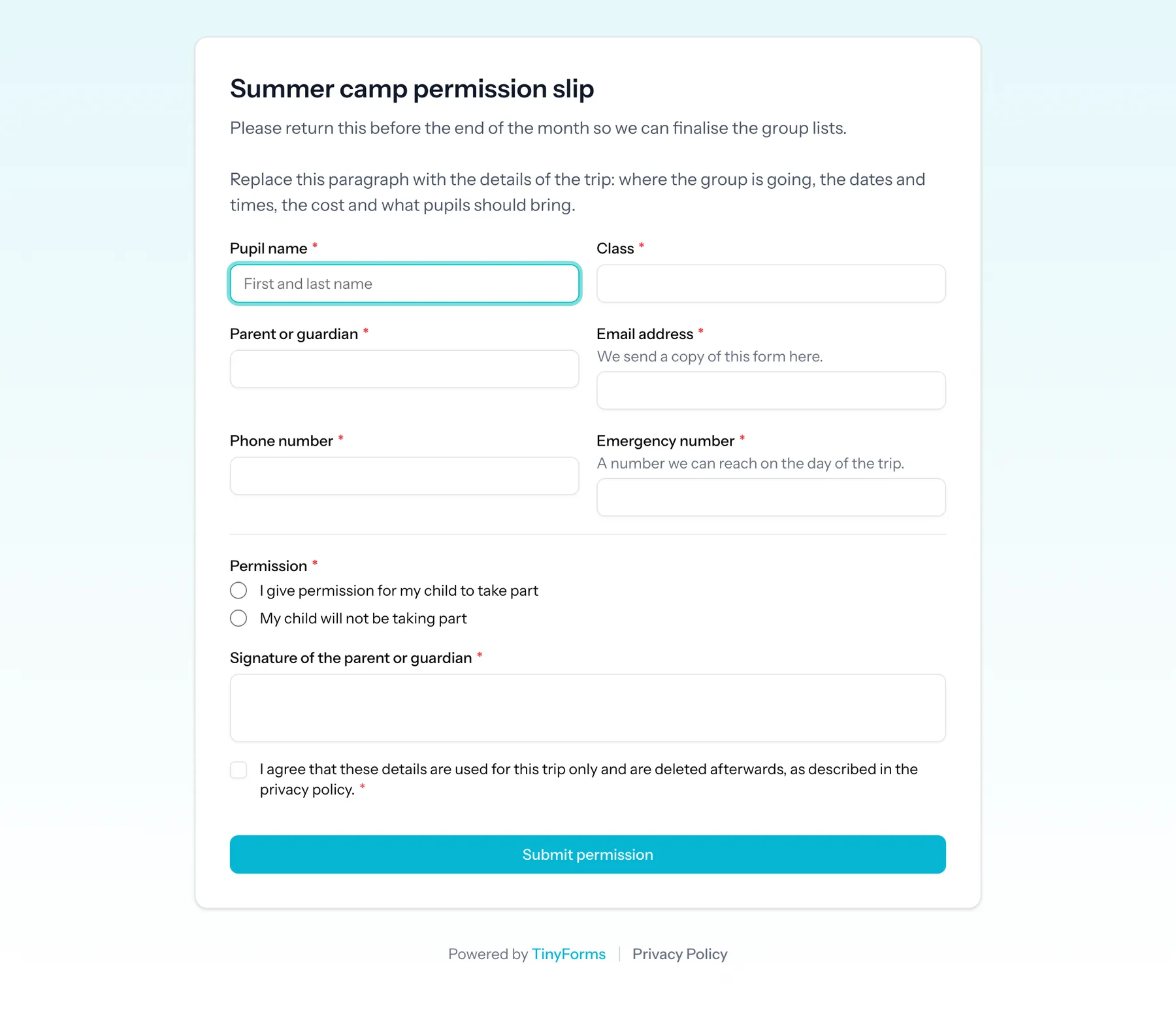
Pupil and class, guardian contact details, an emergency number, permission yes or no, dietary requirements and a signature.
After-school activity registration
Places per activity using per-option limits, so each group fills up and the rest moves to a waiting list automatically.
Parent-evening slots
A choice of time slots with a limit on each, showing how many are left as parents book.
Photo and media consent
A short consent form with your own wording, kept as a record for as long as your policy says and no longer.
From template to signed slips
- 1
Copy the consent template
It already has the guardian details, the permission question, the conditional medical section and the signature field.
- 2
Add your trip details
Fill in the introduction paragraph with the dates, the cost and what to bring, so the form is the single source of truth.
- 3
Set a closing date
Schedule when the form closes and what parents see afterwards, instead of collecting answers past the deadline.
- 4
Check the list before you leave
Every submission shows the answers side by side, with attachments available to download from the workspace.
Questions schools ask
- Do parents need an account?
- No. A published form is a public link that anyone can open and submit without signing up for anything.
- Is a signature collected this way usable?
- The signature field records a drawn signature with the submission, alongside the answers and the moment it was submitted. Whether that satisfies your own policy is a decision for the school; TinyForms records it, it does not certify it.
- Can we make sure medical details are not kept for years?
- Yes. Retention is set per workspace and submissions are deleted automatically once it passes. Free allows up to 30 days, Pro up to a year, and Business can keep them without a ceiling or switch purging off entirely.
- Can several teachers work in the same workspace?
- Yes, with owner, admin and member roles. The Free plan has one seat, Pro has five and Business has twenty.
- Can we collect a contribution for the trip?
- Yes, through your own Mollie or Stripe account, either as one amount or as amounts attached to the options a parent picks. Payments are part of Pro and Business.
Related solutions
Multilingual forms
English, Dutch, French and German throughout, without maintaining a second copy of every form.
How it worksGDPR-friendly forms
EU hosting, automatic deletion after a period you set, and consent recorded with the submission.
How it worksFile uploads
Certificates, photos and documents attached to the right submission, stored privately.
How it worksRelated templates
Replace the paper slip
Copy the consent template, change the trip details, and send the link home.