For sports clubs
Season registration and the fee, in one go
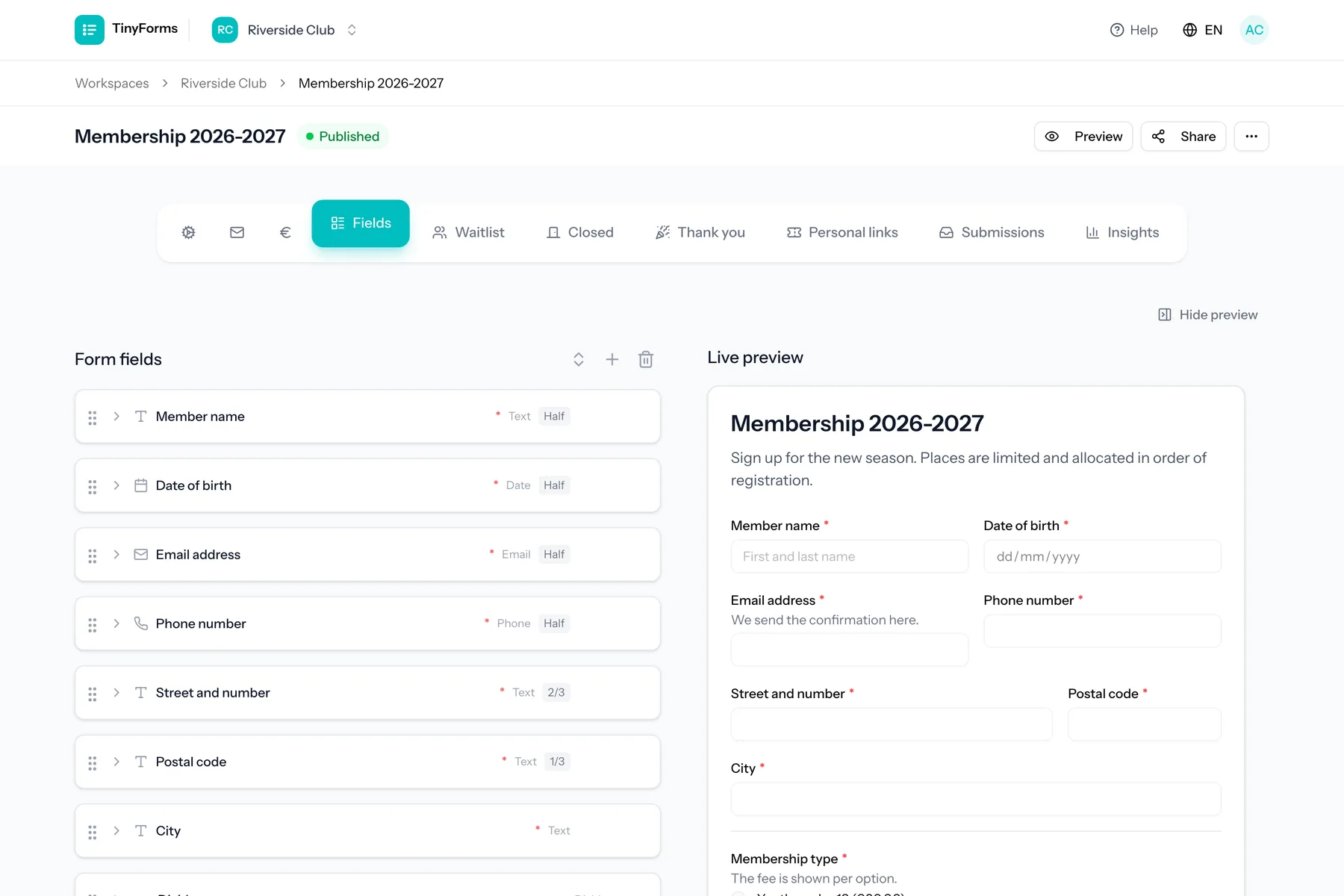
A club registration is really three jobs: collect the member's details, put them in the right team, and get the fee paid. TinyForms does all three in one form, so the person running registrations is not cross-referencing a bank statement in November.
What club registrations run into
Recognisable to anyone who has run a season sign-up.
Registrations and payments never line up
People register but do not pay, or pay without a reference, and matching the two is a evening's work every season.
Teams and age groups overfill
Places are counted by hand, so a group is full before anyone notices and latecomers have to be turned away individually.
Different fees for different members
Youth, adult and family rates mean either three forms or a form that everyone fills in wrong.
Medical notes and photos on the side
Kit sizes, medical notes and a member photo arrive over WhatsApp and never make it into the same list.
What TinyForms does about it
The pieces that make a season registration one job instead of three.
The fee follows the choice
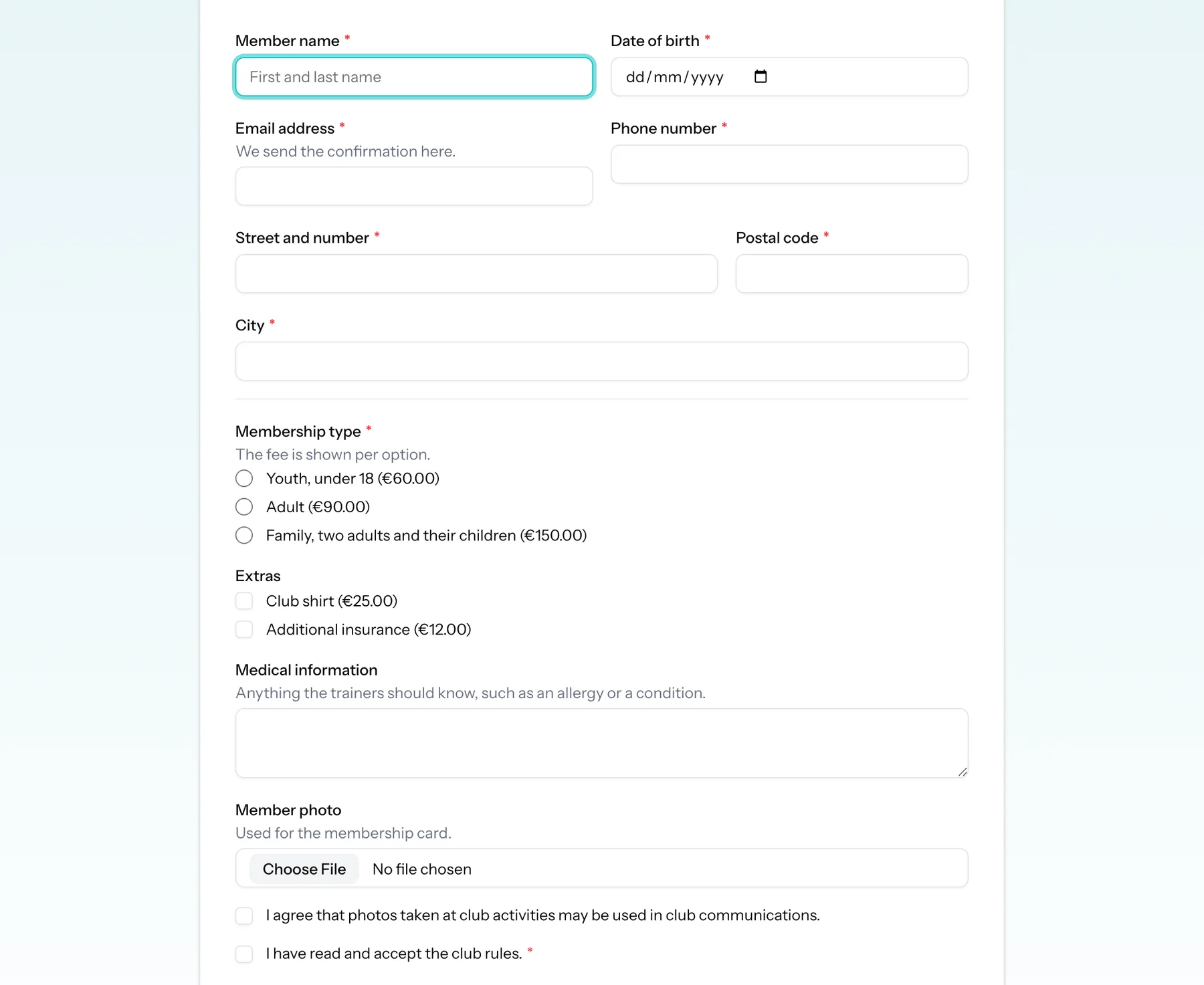
Attach an amount to each membership option and the total is worked out as the member fills in the form, then charged through your own Mollie or Stripe account. Available on Pro and Business.
Places per team, counted for you
Give each option its own limit and show how many places are left. A full option either disappears or keeps taking names as a waiting list, whichever you choose.
Extras on the same form
Kit, insurance or a club shirt are checkboxes with their own amounts, added to the same payment instead of collected separately.
Member photos and certificates
A file-upload field collects the passport photo or medical certificate with the registration, stored privately. Available on Pro and Business.
Straight into your spreadsheet
Sync submissions to Google Sheets or Excel Online as they arrive, so the team lists your coaches use are always current. Available on Pro and Business.
See how the season is filling
Insights show submission and payment counts over time and how the options are being picked. Available on Pro and Business.
What clubs build with it
One registration form usually replaces several.
Season registration with fee
Member and guardian details, membership type with its own price, optional extras, a medical note and agreement to the club rules.
Tournament or camp sign-up
A capped number of places with a waiting list, so a full camp keeps a queue in the order people applied.
Volunteer and canteen rota
Shifts as options with a limit each, so every slot is filled exactly once.
Kit orders
Sizes and quantities with per-item amounts, paid in the same transaction as the order.
Setting up a season
- 1
Copy the club registration template
It comes with membership types, priced extras, a photo upload and the rules consent already in place.
- 2
Connect your Mollie or Stripe account
Add your own API key in the workspace payment settings so fees are paid directly to the club.
- 3
Set the limits per option
Give each team or age group its number of places and decide whether a full one hides or becomes a waiting list.
- 4
Publish and share
Send the link to your members. Payment status is tracked per submission, so you can see at a glance who has paid.
Questions clubs ask
- Does the money go through TinyForms?
- No. You connect your own Mollie or Stripe account, and payments go straight from the member to the club. TinyForms records whether a payment succeeded.
- Can different members pay different amounts?
- Yes. Amounts can be attached to the options of a radio, checkbox or select field, and the total adds up as the member chooses. You can also charge one fixed amount instead.
- What happens when a team is full?
- You decide per field: a full option can be hidden, or it can stay selectable and mark the registration as a waiting-list entry. You can also cap the whole form and run a separate waiting list behind it.
- Which plan do we need?
- Payments, file uploads, spreadsheet sync and insights are part of Pro and Business. Waiting lists, option limits, conditional questions and email notifications are on every plan, and every new workspace trials Pro for fourteen days.
- Can we keep registrations for the whole season?
- Yes. Retention is a workspace setting, up to 30 days on Free, up to a year on Pro, and without a ceiling on Business.
Related solutions
Payments through Mollie or Stripe
Take the money while someone registers, with your own Mollie or Stripe account and a total that follows their choices.
How it worksWaiting lists
Stop at capacity without turning people away: a queue in the order they arrived, kept automatically.
How it worksExcel Online sync
The same live spreadsheet, for organisations that run on Microsoft 365 rather than Google.
How it worksOpen your season registration
Copy the club template, connect Mollie or Stripe, and take registrations and fees in one step.