Capacity
Full, but still collecting names
A registration that simply closes at capacity throws away the people who would have taken a cancelled place. A waiting list keeps them, in order, with only the details you need to reach them.
The problem it solves
Counting places by hand fails in both directions: you either close too late and overbook, or too early and lose registrations you could have taken. And once a place frees up, a waiting list kept in an inbox rarely says clearly who was next. TinyForms counts the places, switches over at the cap, and records queue entries as waiting-list submissions so the order is never in doubt.
Who this is for
Anything with a fixed number of places.
- Events and workshops with a room capacity
- Sports clubs with a maximum team size per age group
- Course and camp registrations that fill up early
- Parent evenings and appointment slots
How it works in TinyForms
There are two levels: the form as a whole, and individual options within it.
- 1
Cap the form
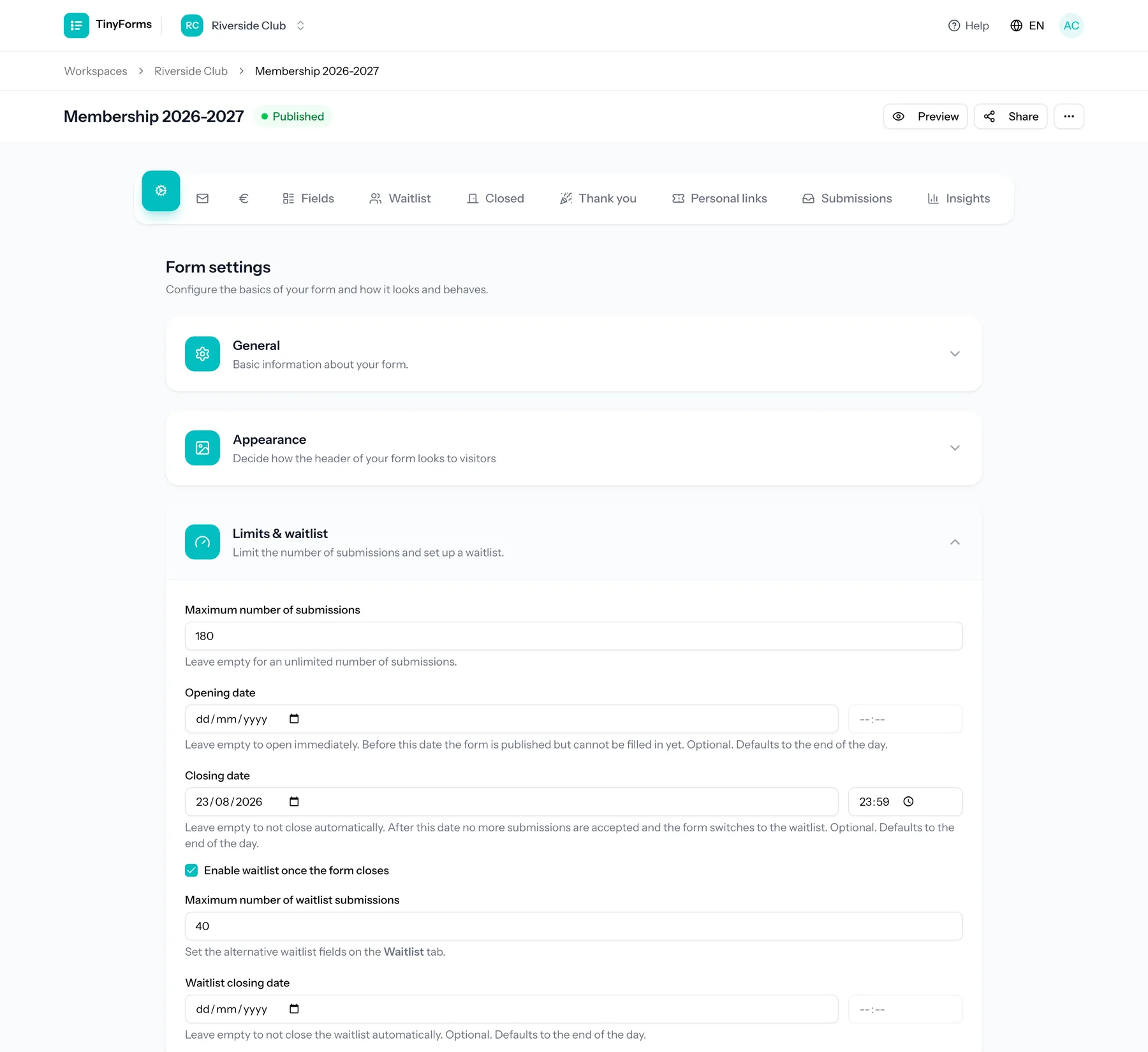
Set a maximum number of submissions, and optionally an opening and closing date. The form moves through scheduled, open, waiting-list and closed states on its own.
- 2
Turn on the waiting list
Give the waiting list its own maximum and its own closing date, so the queue does not grow indefinitely either.
- 3
Ask the queue fewer questions
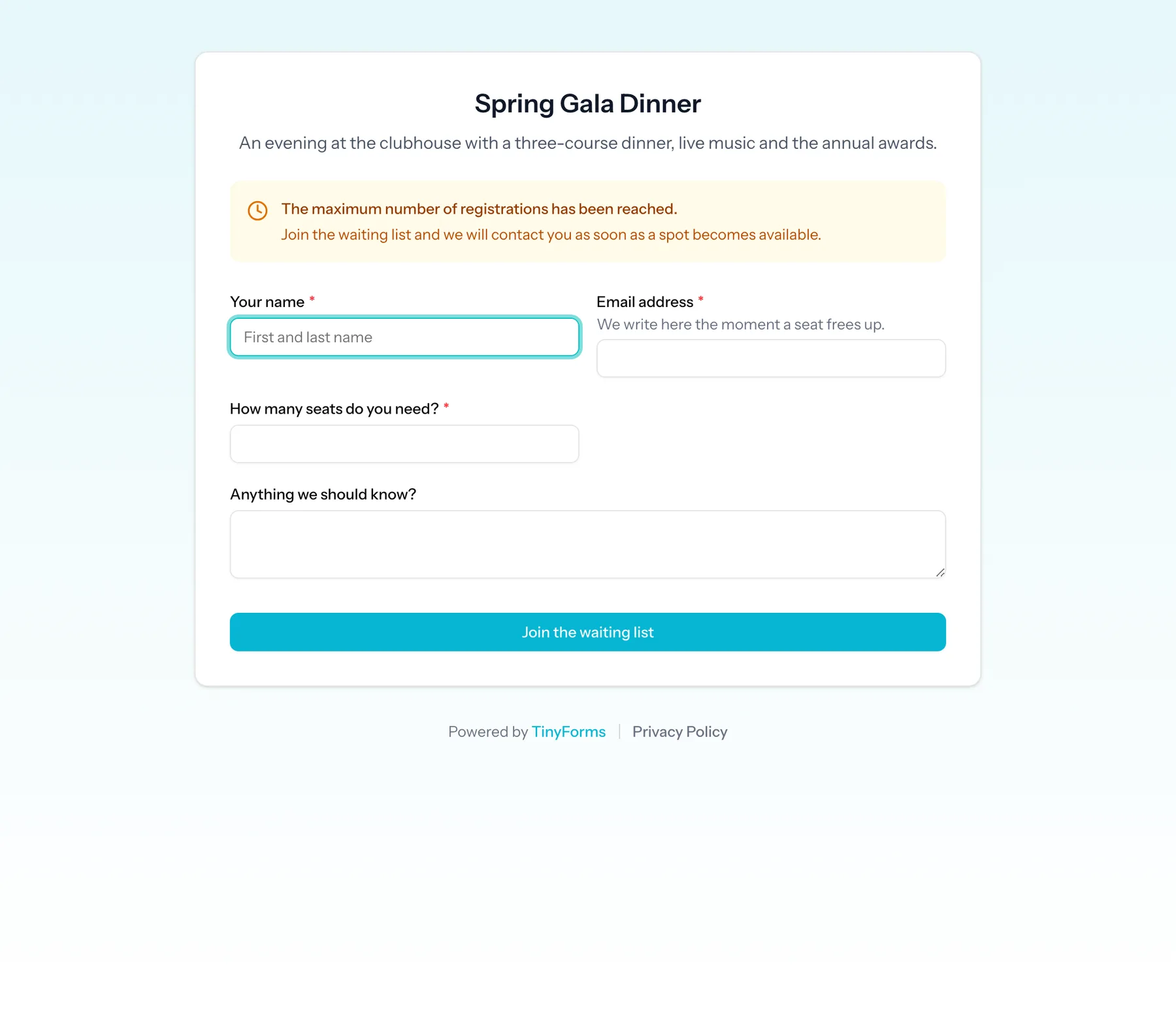
A waiting list can have a different set of fields from the main form. Someone in the queue often only needs to leave a name and an email.
- 4
Or limit individual options
Each option of a choice field can have its own limit and show how many places are left. A full option is either hidden or stays selectable and marks that registration as a waiting-list entry.
Plans and limits
What applies regardless of plan.
Available on every plan
Waiting lists, option limits and the "places left" counter are part of every plan, including Free.
Monthly submission limits still apply
Waiting-list entries are submissions and count towards your plan's monthly total: 100 on Free, 2,500 on Pro and 10,000 on Business.
Promotion is a manual step
TinyForms records the queue and its order. Deciding who moves up from the waiting list, and telling them, stays with you.
Common questions
- Can people tell they are on the waiting list?
- Yes. The form shows your own waiting-list wording once the cap is reached, and the confirmation email they receive comes from that state of the form.
- Can I see who is on the waiting list?
- Yes. Waiting-list submissions are flagged, so you can filter them out of, or into, the list of registrations.
- Does a waiting list work together with payments?
- They can be combined on the same form, but think about the order: a waiting-list entry is a place in a queue, not a confirmed registration, so most organisers collect payment only from the people they promote.
- What is the difference between a form cap and an option limit?
- A form cap limits the whole registration. An option limit caps one choice within it, such as a single team, ticket type or time slot, and you can use both at once.
Who this is for
Set a capacity that manages itself
Copy the waiting-list template and change the sessions and limits to yours.