Business
A form that already knows who is answering
Upload your list of recipients and TinyForms generates a short address for each of them. Their details are filled in, they only see the options that apply to them, and your own reference travels with the answer.
The problem it solves
One public form address means asking everyone the same questions and hoping they answer them the same way. People retype a customer number wrong, pick a date that was never available to them, or answer twice under two spellings of their name. Then matching the replies back to your records becomes a second job. A personal link removes the guesswork: the identifying part is already filled in, the choices are already narrowed, and every reply arrives attached to the record it came from.
Who this is for
Anything where you already know who you are inviting.
- Printed invitations and postal mailings, where the address has to be typed off paper
- Events where each guest may only choose from the dates their host is available
- Membership renewals with the member number already filled in
- Parent evenings and appointment slots assigned per family
- Surveys where the reply has to match a record without asking for the reference again
How it works in TinyForms
Four steps, all of them starting from the list you already have.
- 1
Upload your list
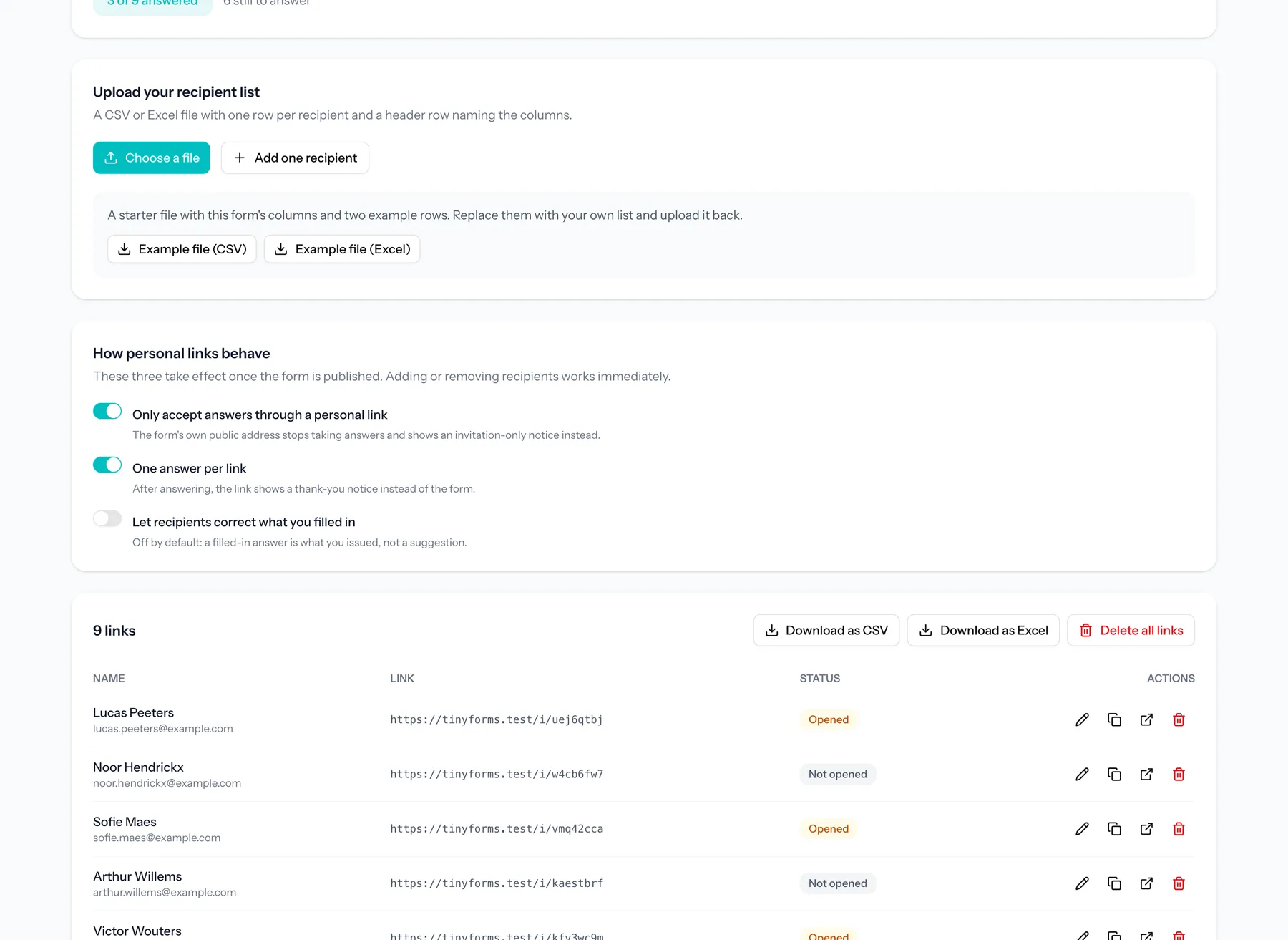
A CSV or Excel file with one row per recipient and a header row. TinyForms reads the columns and shows you the first rows, so you can check the file before anything is created.
- 2
Say what each column means
Nothing is guessed from column names. Point each column at what it is: the name to show, an answer to fill in, the options this recipient may choose from, or a reference to carry along without ever showing it.
- 3
Generate the addresses
Every row gets a short address like tinyforms.tools/i/k7m2qpza. The code avoids characters that are misread on paper, works in capitals, and carries no query string, so it fits on a printed card and survives being typed back.
- 4
Download the list back
Export the same list with the generated address added to every row. That is the file your print shop or your CRM works from, with your own columns still in it.
Plans and limits
What to know before you plan a campaign around it.
Part of the Business plan
Generating and managing personal links needs Business. Links that already exist keep working even if the workspace later moves to a smaller plan, so an invitation in the post is never invalidated by a billing change.
Up to 2,000 recipients per upload
Upload again to add more, or replace the list when a corrected file arrives. Every answer is a submission and counts towards the plan's monthly total.
A link is not a login
Whoever holds the address can answer as that recipient. That is the right trade for an RSVP or a renewal, and the wrong one for anything you would otherwise put behind a password.
Sending stays with you
TinyForms generates and tracks the addresses. Printing, posting and emailing them is yours to do, with whatever you already use.
Common questions
- Can a recipient change what I filled in for them?
- Not by default. Filled-in answers are shown but not editable, and the value that gets stored is the one you issued, whatever the page posts back. You can allow corrections per form when the point is to let people fix their own details.
- Can I stop people answering without an invitation?
- Yes. Switch on "only accept answers through a personal link" and the form's own public address shows an invitation-only notice instead of the fields.
- What happens if someone opens their link twice?
- By default a link is spent once it has been answered and shows a thank-you notice after that. You can turn that off when a link stands for a person rather than for a single reply.
- Can I see who has not answered yet?
- Yes. Every link shows whether it has been opened and whether it has been answered, with a running count, and the export carries the same status per row so you can chase up from a spreadsheet.
- What happens to the recipient data I upload?
- It stays until you delete it. Personal links are not swept up by the automatic submission purge, because a printed address has to keep working for as long as the campaign runs. Deleting a link, or the whole list, erases that data; answers already given keep the reference you carried along.
- Does the link still work if I edit the form?
- Yes. Recipients are separate from the form itself, so adding or removing them takes effect immediately and never asks for a republish. Changes to the fields reach respondents the moment you publish, exactly as they do for any form.
Who this is for
Send an invitation, not a form
Upload your list, map the columns once, and download the addresses ready for print.