Halloween has become one of the busiest evenings of the autumn for schools, sports clubs, youth groups and neighbourhood committees. A spooky trail or a haunted classroom draws families from far beyond your own members, which is wonderful, until two hundred people turn up at seven o'clock for an event that can handle forty at a time.
Below are ten ideas that work well for organisations, practical tips to keep the evening safe and calm, and a step-by-step guide to a registration form that spreads your visitors over start times, so the queue never forms. Throwing a party at home instead? Skip to the RSVP section at the end.
In short:
- Choose one or two main activities and do them well, rather than ten half-finished ones.
- Spread visitors over start times with a fixed number of places each.
- Offer a "not too scary" version for the youngest.
- Let people register and pay online, so you know in advance how many are coming and how much food to buy.
10 Halloween ideas for a school, club or youth group
1. A spooky trail with start times
The classic. Families walk a route through the woods, the park or the school grounds, with volunteers hiding along the way. Groups leave every ten or fifteen minutes, so nobody catches up with the group ahead and every scare lands. It is also the format that benefits most from registration with time slots.
2. A haunted classroom or clubhouse
One room, dark, with sound effects and a few volunteers in costume. It needs little space and works indoors when it rains. Let small groups in at a time and plan five to ten minutes per group.
3. A costume parade with prizes
Short, cheerful and suitable for all ages. Award prizes per age group and for the best group costume, and let a few teachers or coaches judge.
4. A pumpkin carving workshop
Popular, and a natural fit for limited places: you need a table, a pumpkin and a set of tools per participant. Charge a small fee for materials and you will know exactly how many pumpkins to buy.
5. A Halloween escape room or mystery game
Teams solve riddles to escape the "cursed" room or find the missing witch. Ideal for older children and teenagers, who often find the trail too childish.
6. A monster disco in two rounds
An early session for the youngest and a later, louder one for older children. Two rounds also halve the crowd in the hall.
7. A witches' kitchen
Pumpkin soup from a cauldron, "eyeball" cake pops, green lemonade. A food stall pays for itself and keeps families around after their trail.
8. Scary stories by the campfire
A storyteller, blankets and hot chocolate. Calm enough for young children, spooky enough for the rest, and cheap to organise.
9. A glow-in-the-dark treasure hunt
Hide glow sticks or reflective clues across the grounds and hand out a map. It keeps children busy while they wait for their start time.
10. A trick-or-treat route with neighbours and local shops
Ask neighbours and shopkeepers to sign up as a treat stop, and hand families a map with every participating address. Shops are often happy to join: it brings people past their door.
Practical tips for a safe and relaxed evening
- Offer two versions. A "gentle" trail for children under eight and a scary one for older children and adults. Ask which one people want when they register.
- Count in groups, not individuals. A family of five takes one start time. Think about how many groups your route can handle per slot.
- Light and visibility. Reflective vests for volunteers at road crossings, torches for every group, a lit first-aid point.
- Enough volunteers. A trail with scares needs more hands than you think. Plan your volunteer shifts the same way you plan visitors; our guide on filling every volunteer shift explains how.
- A plan B for rain. Decide in advance what moves indoors, and say so in the confirmation.
- Allergies and dietary needs. Ask about them on the registration form if you are serving food.
How to set up the registration form with TinyForms
You can build this form in about twenty minutes. Start from the event registration template, which already asks for the contact details you need and can take payment.
Step 1: Generate the start times
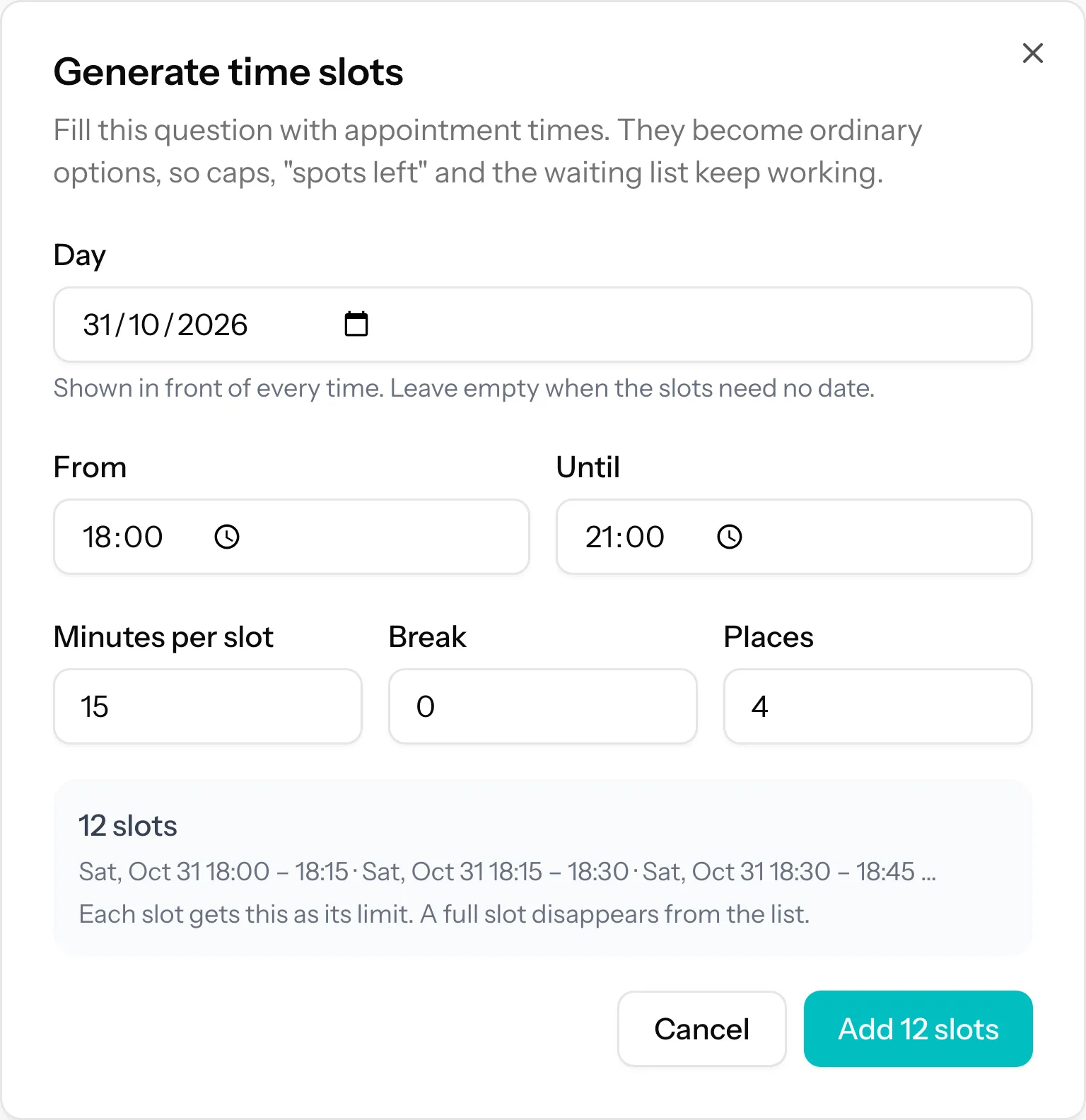
Add a time slot question. Choose the day (31 October), the start and end time (for example 18:00 to 21:00), the length of a slot (15 minutes) and how many registrations fit in one slot. TinyForms generates every start time as an option with its own limit. Switch on the spots left counter, so people choose a quiet slot instead of the one everybody wants.
Note that a limit counts registrations, not people: one family registering takes one place in a slot. Set the capacity per slot in groups, and ask for the number of participants in a separate question.
Step 2: Ask for the number of participants
Add a number question: "How many people are coming?". If you charge per person, give that question a price per unit, and the total follows the number entered.
Step 3: Choose the version
A choice between "Gentle (under 8s)" and "Scary (8 and over)". If you run the two versions as separate routes, give each version its own set of start times and show only the matching set with conditional logic.
Step 4: Take payment while people register
Connect your own Mollie account once, and the form charges the total at the moment someone registers. The submission list then shows who has paid, and you never have to chase a transfer. Payments through Mollie are part of the paid plans.
Step 5: Turn on the waiting list
Let a full start time simply disappear from the list, and put the waiting list on the form as a whole: under Settings, in Limits & waitlist, set the maximum number of registrations to the total of all your slots (twelve slots of eight groups makes 96) and enable the waiting list. Once every slot is taken, the form switches to the waiting list instead of closing, and nobody on it pays. Prefer a waiting list per start time? That works too: a family that picks a full slot then lands on that slot's waiting list and pays nothing for now. When a place in it frees up, open their answer and send them a payment link. That confirms their place in the slot and asks for the amount for the number of people they entered.
If a family cancels, you cancel their registration and the slot opens up again on the form, for whoever is quickest. Want to offer it to the first family on the waiting list instead? Contact them before you cancel, and send them the link once they say yes. Our guide to running a waiting list fairly explains that routine.
Step 6: Send the start time in the confirmation
The confirmation email can repeat the answers someone gave. Put the start time, the meeting point and your rain plan in it, and you will answer far fewer messages on the day.
Throwing a Halloween party at home? Collect RSVPs
For a party with friends or the neighbourhood you do not need start times, but an RSVP form beats counting replies in a group chat. Ask three things: are you coming, with how many, and does anyone have an allergy. With conditional logic, a guest who answers "no" skips the rest. You can also ask whether people are coming in costume, so you know how competitive the prize for best costume will be.
Everything for a simple RSVP works on the free plan, and guests do not need an account.
Frequently asked questions
How many people fit in one start time?
That depends on the route. As a rule of thumb, a scary trail works with one group every ten to fifteen minutes, and a group of up to eight people. Start conservatively; you can raise the limit per slot while registration is open.
Can I set a different price for children and adults?
Yes. Use two number questions, "Children" and "Adults", each with its own price per person. The total adds both up.
Can people register without paying online?
Yes. Payment is optional per form. Many organisations start with free registration for members and switch payments on for open events.