
Every parent council knows the moment: the school fair is in three weeks, the bar still has nobody on it between four and six, and the group chat has gone quiet. Most parents are not unwilling. They were asked too vaguely, too late, or in a way that made saying yes more work than saying nothing.
This guide collects what works for parent councils and PTAs, and shows how to replace the paper list on the classroom door with an online sign-up sheet where parents choose their own slot and a full slot closes by itself.
In short:
- Ask for small, concrete things: one task, one time slot, with an end time.
- Ask early, in the channels parents already read, and let them choose instead of assigning them.
- Use a sign-up form with a limit per shift, so you never have twelve people on cake and nobody on clean-up.
- Confirm every sign-up automatically, and keep a waiting list for the popular slots.
Why parents do not volunteer (and what helps)
The reasons are remarkably consistent. People say no, or say nothing, when:
- The ask is open-ended. "Can you help at the fair?" sounds like a whole Saturday. "Can you run the cake stand from 2 to 3 pm?" sounds like an hour.
- They do not know what the job involves. New parents in particular hesitate when they have no idea what "helping at the bar" means in practice.
- Signing up is effort. Replying to a group chat, finding the list at the school gate, or emailing a committee member are all small hurdles, and small hurdles are enough.
- They feel it is always the same people. A parent council that looks like a closed group gets fewer newcomers.
Almost everything below is a way of removing one of those reasons.
9 tips for a parent council that gets its shifts filled
1. Plan the year at the first meeting
Put every event on one calendar in September: the school fair, the Christmas market, the sports day, the end-of-year party. Parents who know in October that you will need help in May can plan for it, and you can open sign-ups well in advance instead of in a panic.
2. Cut the work into small shifts
One to two hours is the sweet spot. Shorter shifts mean more parents can fit one in, and a parent who enjoyed one hour often comes back for the next event. Name each shift by what it involves and when it ends: "Set-up, Saturday 9:00 to 10:30".
3. Describe every task in one sentence
"Cake stand: sell slices and keep the cash box, no baking needed." That one sentence removes the doubt that keeps newcomers from signing up.
4. Let parents choose instead of assigning them
A rota drawn up by the committee gets swapped, questioned and forgotten. A list where parents pick their own slot gets ownership. It also saves the committee an evening of puzzling.
5. Ask early, and ask where parents already read
Share the sign-up link in the school newsletter, in the class chats and in whatever app your school uses to reach parents. Print a QR code for the school gate and the noticeboard: parents who are waiting at pick-up time are exactly the audience you want.
6. Make it easy for every parent
Not every parent reads the school's language comfortably. Keep sentences short, avoid committee jargon, and where your school has many families with another home language, consider a second version of the form in that language.
7. Confirm, then remind
A confirmation straight after signing up ("You are on the cake stand, Saturday 2 to 3 pm") prevents most no-shows on its own. A short reminder a few days before the event does the rest.
8. Keep a reserve
Someone always falls ill. A waiting list for the popular shifts, or a separate "I can step in if needed" option, gives you a list of people to call on the day.
9. Say thank you, and show what it achieved
Tell parents what the fair raised and what it will pay for: the new playground equipment, the school trip subsidy. People who see the result of their hour are the ones who sign up again.
How to set up a shift sign-up form with TinyForms
The paper list and the shared spreadsheet both have the same problem: anyone can overwrite anyone, and nothing stops a slot from overfilling. A form with a limit per option solves both. Here is how to build one.
Step 1: Start from the volunteer template
Copy the volunteer sign-up template into your workspace. It already asks for the name, email address and phone number you need to reach people on the day, and it carries a consent checkbox for your privacy statement.
Step 2: Turn the tasks into shifts with a limit
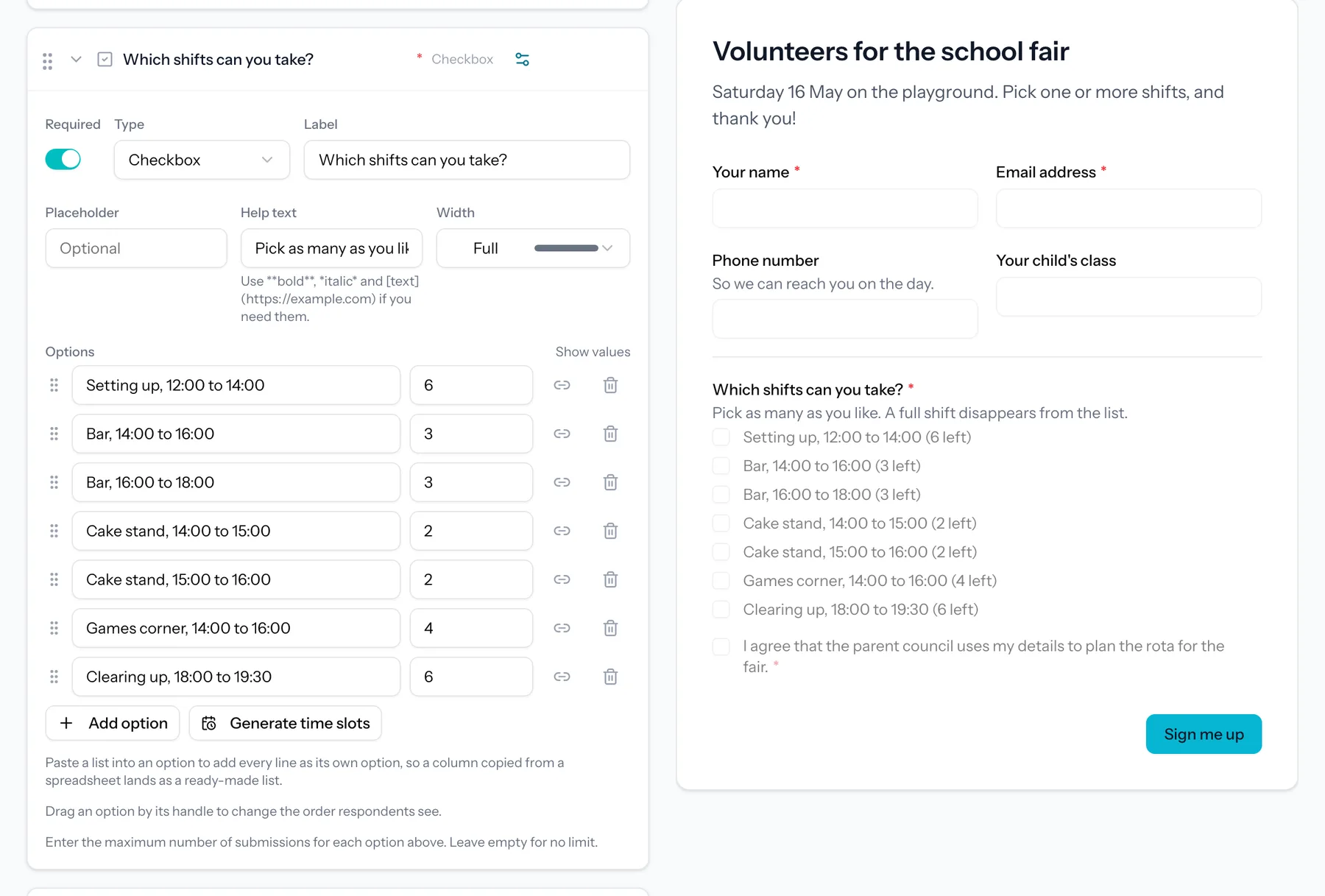
Replace the task question with a checkbox question that lists every shift as an option: "Bar, 14:00 to 16:00", "Cake stand, 14:00 to 15:00", and so on. Then give every option its own maximum: three people on the bar, two on the cake stand. Switch on the "spots left" counter so parents see where help is needed most.
Because it is a checkbox question, a parent can take two shifts in one go. A shift that is full can no longer be picked, so it never overfills. For evenly spaced slots, such as parent-teacher evenings or start times, the time slot shortcut generates the whole run from a start time, an end time and a slot length. The field types article explains both.
Step 3: Add a follow-up question only when it applies
With conditional logic, a question only appears when it is relevant. Someone who picks the cake stand can be asked whether they will also bake a cake, while everyone else never sees that question.
Step 4: Switch on the confirmation email
Turn on the confirmation email to the person who signed up, and repeat their choice in it. A confirmation that names the shift and the time is the best reminder there is. Set the reply-to address to the committee's address, so questions reach you rather than nobody. See email notifications for the settings.
Step 5: Share the link and the QR code
Every form has a short link and a QR code. Put the link in the newsletter and the class chats, and print the QR code for the gate. Parents do not need an account to sign up.
Step 6: Follow sign-ups and export the rota
Every sign-up arrives in the submissions list, with a count per shift. When someone cancels, you cancel their sign-up and the place opens up again for someone else. Before the event, export the list to Excel or CSV and you have your rota, ready to print.
Example: a school fair rota
| Shift | Time | Places |
|---|---|---|
| Set-up | 09:00 to 10:30 | 6 |
| Bar | 14:00 to 16:00 | 3 |
| Bar | 16:00 to 18:00 | 3 |
| Cake stand | 14:00 to 15:00 | 2 |
| Cake stand | 15:00 to 16:00 | 2 |
| Games for the youngest | 14:00 to 16:00 | 4 |
| Clearing up | 18:00 to 19:30 | 6 |
Seven options, each with its own limit, in one checkbox question. Add a waiting list for when the form as a whole is full, and you are done in a quarter of an hour.
What does it cost?
Everything in this guide works on the free plan: shifts with limits, the spots left counter, conditional questions, the confirmation email, the QR code and the export. If your parent council also wants to sell meal vouchers or tickets through the same form, payments through Mollie are part of the paid plans. The pricing page lists what each plan includes.
Frequently asked questions
Can a parent sign up for more than one shift?
Yes. With a checkbox question a parent ticks as many shifts as they like, and every shift keeps its own limit.
What happens when a shift is full?
It can no longer be chosen. With the spots left counter switched on, parents see beforehand how many places each shift still has. If you want to keep names for later, switch on the waiting list.
Do parents need an account?
No. They open the link, fill in the form and get a confirmation by email. Only the members of the parent council who manage the sign-ups need an account.
Is this allowed under the GDPR?
You are collecting names and contact details for a clear purpose, which is fine as long as you say so and do not keep them longer than necessary. TinyForms is hosted in the EU, shows your privacy statement on the form and deletes submissions automatically after the retention period you choose. More in data and privacy.