
The beginners' running group has fifteen places, the pottery workshop has eight wheels, the holiday football camp has two coaches. You open registrations on a Monday evening and by Tuesday lunchtime they are gone. What happens next decides whether people remember your club as fair or as the place where you had to know someone.
A registration form that simply closes throws away the people who would have taken a cancelled place. A waiting list kept in an inbox and somebody's memory rarely says who was next. This guide covers when you need a waiting list, how to run one fairly (order, a deadline to respond, clear messages) and how to build a registration form with a waiting list in TinyForms that switches over on its own once the activity is full. It is also honest about the part you still do yourself.
In short:
- A waiting list is worth it when places are fixed and demand is higher than what you can offer.
- Agree on the rules before you open: first come, first served, a deadline to respond and a closing date for the list.
- Tell people on the list that they do not have a place yet, and what happens next.
- TinyForms switches to the waiting list on its own and frees a place when you cancel a registration. Offering that place to the next person is something you do yourself.
When do you need a waiting list?
Not every activity needs one. A waiting list makes sense when three things are true.
The number of places is fixed. A room that holds thirty, a pool with three lanes, a coach-to-child ratio your insurer insists on, a minibus with sixteen seats. If you can simply add chairs, add chairs.
Demand is higher than supply. Swimming lessons, holiday camps, Scout sections and popular workshops fill up within hours. If last year's edition was full on day one, this year's will be too.
People drop out. Children get ill, plans change, a family moves house. With a waiting list every cancellation becomes a happy phone call instead of an empty place, especially for free activities, where more people drop out.
When the queue is longer than the activity itself, a waiting list is not the answer. Add a second session or a second group instead, and use the waiting list for the gaps that remain.
How to run a waiting list fairly
A waiting list is a promise. People accept not getting a place more easily when they can see the rules are the same for everyone.
Decide on the order, and say it out loud
First come, first served is the easiest rule to explain and the hardest to argue with. If you use another rule (members before non-members, siblings of children already in the group, local residents first), write it on the form, so nobody discovers it afterwards. Ask the question that lets you apply it on the waiting list itself, such as "Are you a member?".
Give a deadline to respond
When a place comes free, offer it to the next person with a clear deadline: "Let us know by Thursday 8 pm". Forty-eight hours works well weeks ahead of the activity. In the last week before it starts, 24 hours or even the same evening is fair. Without a deadline a place can sit unused for days while the person after them would have said yes immediately.
Communicate at every step
- On the form: explain that joining the waiting list does not give someone a place.
- In the confirmation: say what happens next and roughly when they will hear from you, and ask everyone to cancel early if they cannot come.
- When the list closes: let the people who did not get a place know. A short message ("unfortunately no place came free this time") is far better than silence.
Close the waiting list on time
A waiting list for a camp in July is pointless if you only offer a place the evening before. Choose a date after which you no longer fill freed places, and close the list on that date. That way nobody keeps hoping when there is no real chance left.
What TinyForms does, and what you do yourself
It is worth being clear about this before you set anything up.
TinyForms does:
- count registrations and switch the form to the waiting list on its own once the maximum is reached, or once the registration closing date has passed;
- give the waiting list its own maximum, its own closing date and its own questions;
- record every waiting-list entry with the date and time it arrived, so you can filter the submissions on "waiting list" and see the order at a glance;
- free the place at once when you cancel a registration, with a refund in the same step if the person paid through Mollie.
TinyForms does not:
- move the next person from the waiting list into a freed place;
- email the person at the top of the list.
That is a deliberate choice: whether someone still wants the place, and still has time for it, is something only a short message can tell you. There is one more thing to know. As long as your registration period is open, a freed place reappears on the form, and whoever fills it in first gets it. That is not necessarily the person at the top of your list. The routine below handles both.
A simple routine for each cancellation
- Do not cancel straight away. When someone drops out, first open the submissions, filter on the waiting list and find the oldest entry. That person is next.
- Offer the place, with a deadline. Send an email or call, and give a clear time to reply. Give their entry a label such as "Offered" and put the date and the deadline in the internal note, so a colleague can see where things stand.
- On a yes: cancel the registration of the person who dropped out (and refund it if they paid), cancel the waiting-list entry of the person moving up, and send them the link to the form straight away. They now register, and pay if needed, like anyone else. Ask them to do it within the hour, since the place is open on the form until they do.
- On a no, or no answer by the deadline: change the label to "Declined" or "No answer" and move on to the next person.
Once the registration closing date has passed, a cancellation no longer reopens the form, so the freed place cannot be taken by a passer-by. In that case you confirm the place to the next person yourself by email, and the label on their waiting-list entry is your record.
How to set up the registration form in TinyForms
You can build this in a quarter of an hour. The quickest start is the template for a registration with a waiting list: it takes twenty registrations, spreads them over two sessions of ten places and asks the queue only for a name, an email, a phone number and a note.
Step 1: Set the maximum
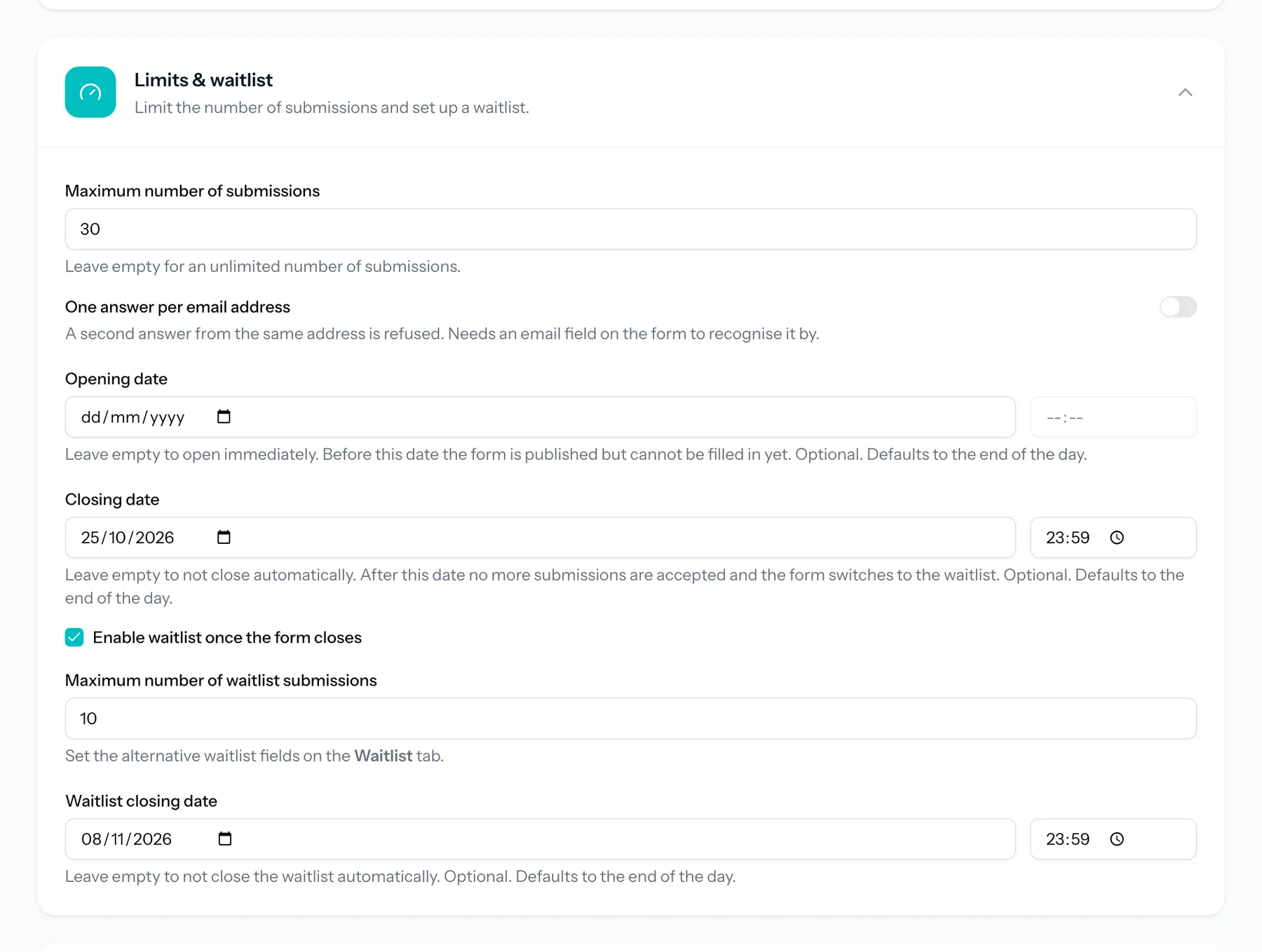
Under Settings, in Limits & waitlist, enter the maximum number of registrations. Note that it counts registrations, not people: a family registering three children in one form takes one place. If places are per child, let people register per child. Add a closing date if registrations should stop on a fixed day as well.
Step 2: Switch on the waiting list
Tick "Enable waitlist once the form closes". The waiting list gets its own maximum and its own closing date, independent of the main form. A rule of thumb for the maximum: around a third of your places. Ten names behind thirty places is a realistic queue; a hundred is false hope.
Step 3: Give the waiting list its own questions
The waiting list starts empty, however many questions your form has. On the Waitlist tab, use Copy fields to take the name and email from your own form. Copied that way, both sets of answers land in the same column of your export, and the confirmation email reaches people in the queue too. Ask only what you need to contact someone and to apply your order rule. Put a short paragraph at the top that explains how it works ("We offer freed places in order of arrival and give you 48 hours to reply").
Once the form is full, visitors see a notice that the maximum has been reached and a button to join the waiting list, so nobody submits thinking they have a place.
Step 4: Or set a maximum per option
Often it is not the activity that is full, but one group or one week. On a choice question, turn on "Limit selections per option", type the number of places beside each option and choose "Keep it as a waiting list" under "When an option is full". Turn on the counter of places left, so people see a quiet group before they choose the full one. A choice placed on the waiting list is marked as such in the submission and in the confirmation email.
One limit to know: a waiting list per option cannot be combined with a price on that same question, and nobody should pay for a place they do not have yet. For a paid activity, use the waiting list of the whole form, where entries never pay. Running a camp with several weeks? Our guide to camp registrations with limited places per week shows how to split them.
Step 5: Prevent double entries
Turn on "One answer per email address". Someone already on the waiting list counts as having answered, so the same family cannot join the queue twice and jump ahead. That is also why the routine above cancels the waiting-list entry of the person moving up: after that, they can register with the same address.
Step 6: Write a confirmation that fits both
Registrations and waiting-list entries receive the same confirmation email, with their own answers below it. Write the intro so it works for both: thank them, say that registrations have a place and that people on the waiting list will hear from you if one comes free, and add your cancellation deadline. More in the help article on email notifications.
The same approach works for other things with a limit: start times for a Halloween trail or volunteer shifts at a school fair.
What does it cost?
Waiting lists, limits per option, the places-left counter, labels and the confirmation email are available on every plan, including Free. Waiting-list entries are submissions, so they count towards your monthly allowance: 100 on Free, 2,500 on Pro and 10,000 on Business. Taking payment through Mollie, with refunds from the submission list, is part of the paid plans. See pricing for the details, or read more about waiting lists in TinyForms.
Frequently asked questions
Does TinyForms automatically move someone from the waiting list into a free place?
No. When you cancel a registration, the place is free again, but TinyForms does not move anyone up and does not email anyone. You contact the next person yourself, which is also the moment to check whether they still want the place.
Do people on the waiting list have to pay?
No. A form that takes payment never charges a waiting-list entry. The person pays once they have a place and register through the form.
Can I close the waiting list before the activity starts?
Yes. The waiting list has its own closing date, separate from the closing date of the registration. After that date a full form shows your closed message instead of the waiting list.