
Sooner or later, almost every student has to do research of their own: a final-year project, a science fair topic, a bachelor's or master's thesis. A survey is often the most practical way to collect your own data. It is quick to send out, it reaches far more people than interviews, and it gives you numbers you can compare and chart.
It is also easy to get wrong. A survey with vague or leading questions produces answers you cannot use, and you usually only notice when the deadline is close. This guide covers when a survey is the right method, how to write questions that give you clean data, what to arrange around privacy and consent, and how to build and share your survey with TinyForms.
In short:
- Start from your research question, not from the questions you would like to ask.
- Keep the survey short: five to ten minutes, one topic per page.
- Ask one thing per question, in neutral words, with answer options that do not overlap.
- Test it on three to five people before you send it out.
- Ask for consent at the start, collect no more personal data than you need, and export your results in time.
Why a survey is a good research method (and when it is not)
A survey is strong when you want to know how many, how often or how much, and when you want to compare groups. How many students in your school have a part-time job? Do pupils who sleep less rate their concentration lower? Are older club members more satisfied than younger ones? Those are survey questions.
A survey is weaker when you want to understand why people do something in depth. Open questions in a survey get short answers, and you cannot ask a follow-up. For that, interviews work better. Many good projects combine the two: a survey for the broad picture, and three or four interviews to explain what the numbers show.
Other advantages that matter for a school project:
- Speed. A survey can collect a hundred responses in a week. A hundred interviews would take months.
- Comparable answers. Everyone answers the same questions with the same options, so you can count and compare.
- Respondents can answer when it suits them. That raises the response rate, especially among busy people such as parents and teachers.
- Your data is digital from the start. No typing over paper forms: you export straight to Excel, Google Sheets, SPSS or R.
Before you write a single question
Start from your research question
Write your research question down, and split it into sub-questions. For every question you consider adding to the survey, ask yourself: which sub-question does this answer? If the answer is "none, but it would be interesting", leave it out. Every extra question costs you respondents.
Decide who you want to hear from
Your population is the group your conclusions are about: all students in the third year, all members of the club, all parents of the school. Your sample is the people who actually answer. Be honest in your report about how well the second represents the first. A survey shared only in your own class says something about your class, not about "young people".
How many responses do you need?
For a school project that describes a group, around 50 to 100 responses is usually enough to say something meaningful. If you want to compare groups (for example boys and girls, or first and sixth years), aim for at least 30 per group. For a thesis your supervisor will often have expectations; ask early. What matters more than the exact number is that you describe your sample and its limitations honestly.
Writing good survey questions
One thing per question
"Are you satisfied with the canteen's food and prices?" asks two things. Someone who likes the food but finds it expensive cannot answer. Split it into two questions.
Neutral wording
"Do you agree that the school day is far too long?" steers people towards yes. "How do you find the length of the school day?" with options from "much too short" to "much too long" does not.
Answer options that cover everything and do not overlap
Age groups "12 to 14" and "14 to 16" overlap at 14. "0 to 2 hours" and "3 to 5 hours" leave a gap. Check every set of options, and add "other" or "I don't know" where someone might not fit.
Use scales consistently
For opinions, a five-point scale works well: strongly disagree, disagree, neutral, agree, strongly agree. Label every point, not just the ends, and keep the same direction throughout the survey so respondents do not have to switch.
Easy questions first, personal questions last
Start with simple, factual questions to get people going. Background questions such as age, class or gender go at the end: by then people have invested in the survey and are more willing to answer them.
Keep it short
Five to ten minutes is the limit for most respondents, and less is better. Show the time on the first page ("this takes about 6 minutes") and keep that promise.
Examples: from weak to strong
| Weak question | Why it fails | Better |
|---|---|---|
| How much do you use social media? | "Much" means something different to everyone | On an average school day, how many hours do you spend on social media? (less than 1, 1 to less than 2, 2 to less than 3, 3 to less than 4, 4 or more) |
| Don't you think homework is useless? | Leading, and a negative question is confusing | How useful do you find your homework? (not useful at all ... very useful) |
| Do you exercise and eat healthily? | Two questions in one | Two separate questions |
| How old are you? (12 to 14, 14 to 16, 16 to 18) | Overlapping options | 12 or 13, 14 or 15, 16 or 17, 18 or older |
Test it before you send it
Ask three to five people from your target group to fill in the survey while you watch, or to tell you afterwards where they hesitated. You will almost always find a question that is understood differently than you meant. Fixing it then costs five minutes; finding it after a hundred responses costs your data.
Privacy, consent and research ethics
Even a school survey collects data about people, so treat it with care. Your teacher or supervisor will appreciate it, and for a thesis it is often required.
- Explain at the start who you are, what the research is about, how long the survey takes, that taking part is voluntary, what happens to the answers and how people can reach you.
- Ask for consent with a required checkbox before the first question.
- Collect only what you need. If the survey is anonymous, do not ask for names or email addresses. Background questions in broad categories (age group rather than date of birth) make it harder to identify someone.
- Minors. If your respondents are under 16, check with your school or supervisor whether you need permission from parents.
- Be precise about "anonymous". Like most online form tools, TinyForms records the IP address and browser of every response to protect forms against spam, and the IP address appears as a column in the export. Delete that column before you analyse or share your data, and say "the answers are processed anonymously" rather than promising something technically stricter.
- Delete what you no longer need. Keep the raw data until your project is graded, then delete it.
How to build your survey with TinyForms
Step 1: Start from a template or a blank form
Create a free account and start a new form, or copy the feedback survey template and adapt its questions to your research.
Step 2: Write your introduction and consent
Add a paragraph at the top with the explanation above, followed by a required consent checkbox: "I have read the information above and agree to take part."
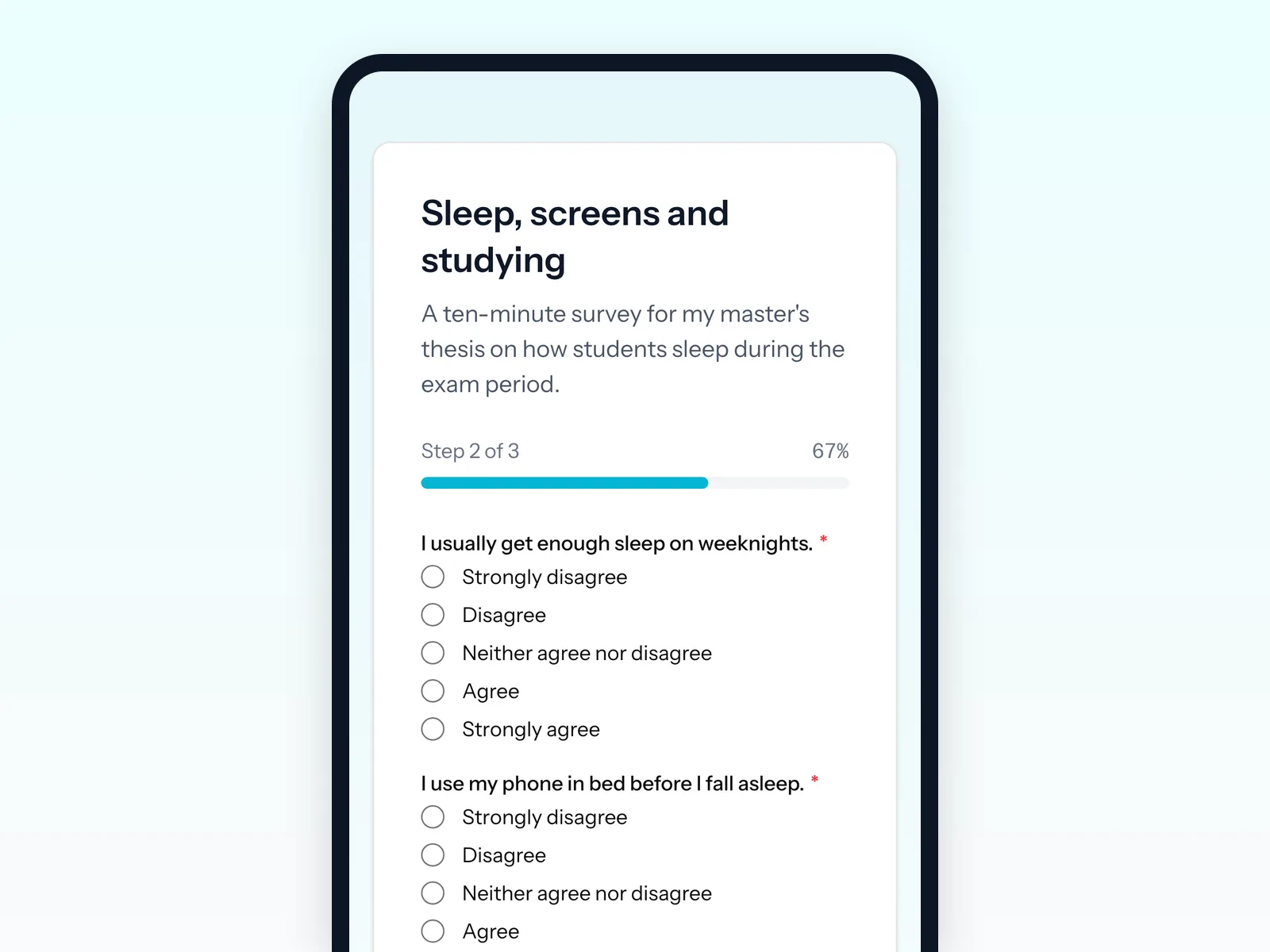
Step 3: Split the survey into pages
Use page breaks to put one topic on each page. A respondent sees a short page rather than a long scroll, which feels quicker and keeps more people going until the end.
Step 4: Choose the right question type
- One answer from a list: a radio group. This is also the easiest way to build a five-point agreement scale on every plan.
- Several answers: checkboxes, ideally with an "other" option.
- A number: a number question with a minimum and maximum, so nobody answers "15 hours" to "how many hours do you sleep".
- An open answer: long text, but use it sparingly. Open answers take a long time to analyse.
The paid plans add a rating and slider question, but you do not need them: a labelled radio scale gives you the same data. The field types article lists every option.
Step 5: Skip questions that do not apply
With conditional logic, a question only appears when an earlier answer makes it relevant. Someone who answers "no" to "do you have a part-time job?" never sees the questions about working hours. That keeps the survey short and your data clean.
Step 6: Preview, test and publish
Preview the form, have your test respondents fill it in, fix what they stumbled on, then publish. Delete the test responses before you share the real link.
Step 7: Share the link and the QR code
Share the link where your target group already is: class chats, the school's messaging platform, social media, a club newsletter. Print the QR code on a poster for the corridor or the canteen. Respondents do not need an account.
Step 8: Export and analyse
Export your responses to CSV or Excel. Every question becomes a column and every respondent a row, which opens directly in Excel, Google Sheets, SPSS, JASP or R. See exporting and insights for the details.
What you should know about the free plan
The free plan is enough for most school projects, but check three limits before you start:
- 100 responses per month. Enough for a typical project. If you expect more, spread collection over two months or look at a paid plan.
- Responses are kept for up to 30 days. On the free plan, responses are deleted automatically after the retention period. Export your data regularly, and certainly before the period runs out.
- Charts are a paid feature. The insights tab with a chart per question is part of the paid plans. On the free plan you make your charts from the export, which you will want to do for your report anyway.
New workspaces start with a 14-day trial of Pro, so you can try the charts first. The pricing page shows every limit.
Getting enough responses
- Ask personally. A message to someone you know works far better than a link in a large group.
- Explain why it matters. "It's for my final project and takes five minutes" is honest and effective.
- Choose your moment. Not during exams or holidays.
- Send one reminder after about a week. Most extra responses come in the day of the reminder.
- Thank people. On the thank-you page, and when you share your results afterwards.
Frequently asked questions
How many respondents do I need for a school project?
Usually 50 to 100 is enough to describe a group, and at least 30 per group if you want to compare groups. More important than the number is describing who answered and what that means for your conclusions.
Is my survey anonymous?
Only if you do not ask for names, email addresses or other details that identify someone. TinyForms records the IP address of each response against spam; remove that column from your export before you analyse or share the data.
Can I analyse the results in SPSS, R or Excel?
Yes. The export is a standard CSV or Excel file with one column per question, which every analysis tool can read.
Can I use TinyForms for a bachelor's or master's thesis?
Yes. TinyForms is hosted in the EU and built with the GDPR in mind, which helps when your institution asks where your data is stored. Do check whether your university requires a specific tool for research data.