
Late August, and the new season is around the corner. For the treasurer of a sports club, a choir, a scouting group or a neighbourhood association, that means one job above all: collecting the membership fees. And every year it goes the same way. You send out the bank details, half the members pay within a week, a quarter pay with the wrong reference or from a partner's account, and the rest need three reminders and a word at the clubhouse before October is over.
This guide gathers the tips that make collecting membership fees (or dues, whatever your club calls them) a lot less painful: when to ask, how to handle family discounts, how to remind people and how to keep one member list instead of five. It ends with a step-by-step guide to a membership form where members register and pay in one go, so there is nothing left to match against a bank statement.
In short:
- Fix your fees and membership types before the season starts, and keep them simple.
- Open the membership round in late August and set a clear deadline before the first match, rehearsal or meeting.
- Let members pay at the moment they register, so a registration is either paid or visibly not.
- Plan your reminders in your own channels, and keep the member list in one place your board can reach.
Why chasing bank transfers takes so much time
A bank transfer looks free and simple, until you have to work out who it came from. The same problems turn up in every club:
- The reference is missing or wrong. "Membership Lisa" says nothing when there are three Lisas in the youth section.
- Someone else paid. A parent, a partner or a grandparent pays from their own account, under a name that appears nowhere in your member list.
- The amount does not match. Somebody pays the adult fee for a child, or two siblings in one transfer with the family discount worked out their own way.
- Nobody knows who is still missing. Registration lives in one spreadsheet, payments in the bank app, and only the treasurer can compare the two.
Every one of those problems disappears when registering and paying are the same step.
8 tips for collecting membership fees
1. Decide the fees before you open the round
Agree on the membership types and their prices before summer, so nothing changes once people start paying. Three to five types is plenty: youth, adult, family and supporting member, for example. Every extra type is an extra question from a member who is not sure which one applies.
2. Get the timing right
Late August and early September is when people are in "new season" mode: training schedules are out, children are back at school, and the club is on everyone's mind. Open the round then, and set a deadline that means something, such as the first match, the first rehearsal or the date your federation needs the member list for insurance. A form with a closing date makes that deadline real.
3. Make family discounts easy to understand
Keep the rule simple and visible: a fixed family membership, or a lower price from the second child onwards. Avoid rules that need a calculator. If the discount is built into the form, nobody has to work it out, and nobody gets it wrong.
4. Offer a reduced fee without questions
Some families find a full membership fee a stretch. A "reduced fee" option on the form, no proof required, keeps those members in the club with their dignity intact. Many towns and regions also have schemes that pay part of a child's membership fee for families on a low income; mention the local one on your form or in your welcome mail.
5. Ask for payment in the same step as the registration
The single biggest improvement. When a member pays while registering, you never have to match a transfer to a name again. The registration simply shows "paid", or it does not. Payments by card or a local method like Bancontact or iDEAL take seconds on a phone, which is where most members fill in forms anyway.
6. Plan your reminders in your own channels
People rarely refuse to pay; they forget. Plan two reminders in advance: one a week before the deadline, one on the day itself. Send them through the channels your members already read, such as the club newsletter, the team WhatsApp groups or a post on your website. A friendly word from the coach or the section leader often works better than any email from the treasurer.
7. Keep one member list, not five
The coach has a list, the secretary has one, the treasurer has another. Choose one place where the member list lives, make sure at least two board members can reach it, and let everything else read from it. Only collect what you actually need for running the club: contact details, a date of birth if it decides the category, and the consents you need.
8. Give the treasurer an export, not a pile of screenshots
At the end of the round your treasurer needs a list of what came in, when, and from whom. A clean export saves an evening of copying amounts out of the banking app, and it is what the members checking the accounts at the general meeting will want to see.
How to set up a membership form with TinyForms
With TinyForms you can build a membership form where members register and pay in about half an hour. Here is how.
Step 1: Start from the membership template
Copy the association membership template to your workspace. It already asks for name, date of birth, email, phone and address, whether someone is a new member or renewing, and whether they would like to help out.
Step 2: Add your membership types, each with its own price
Turn the membership question into a choice between your types, for example "Youth (under 18), €80", "Adult, €120", "Family, €220" and "Supporting member, €25". Switch on payments for the form, then give each option its own amount. The form adds it up while people fill it in, and they see exactly what they will pay before they submit.
For a discount from the second child onwards, add a number question "How many additional children?" with a price per unit, and the total follows the number entered. An option without a price, for honorary members for example, takes no payment at all. The article on accepting payments explains every pricing option.
Step 3: Connect your own Mollie account
Payments run through your club's own Mollie account, so the money goes straight to your club's bank account and TinyForms is never in the middle. Mollie charges its own fee per transaction, depending on the payment method; TinyForms adds no fee of its own. You paste your Mollie API key into the workspace settings once, as described in finding your Mollie API key. Fill in the form yourself and complete one real payment before you share it, so you know the money arrives.
Step 4: Keep the member list in Google Sheets or Excel Online
Connect Google Sheets or Excel Online to your workspace and switch on syncing for the form. TinyForms creates the spreadsheet with a column per question and adds a row for every new member. On a form that charges, the row arrives once the payment has gone through, so the sheet becomes your list of paid members, ready to share with coaches and section leaders. See Google Sheets sync or Excel Online sync.
Step 5: Send existing members a personal, prefilled link
Most of your members are renewing, and retyping their address every year makes people put it off. With personal links you upload your current member list as a CSV or Excel file, and every member gets their own address for the form with their name, email and address already filled in. A column can also narrow the membership types, so a youth member only sees the youth fees. Switch on "Let recipients correct what you filled in" so members can update a changed address.
TinyForms does not send these links itself. You download them as a list and send them through your own newsletter tool or mail merge, or print the QR codes. The list then shows who has opened their link and who has answered. Personal links are part of the Business plan; the personal links article covers the details.
Step 6: Share the form and follow the payments
Share the form's short link or QR code in the newsletter, the WhatsApp groups and on the clubhouse notice board. Members do not need an account. Every registration lands in the submissions list with its payment status: paid, pending (started but not finished) or failed. Next to it, the Payments tab lists every payment the form received, with the date, the amount, any refund and its Mollie reference.
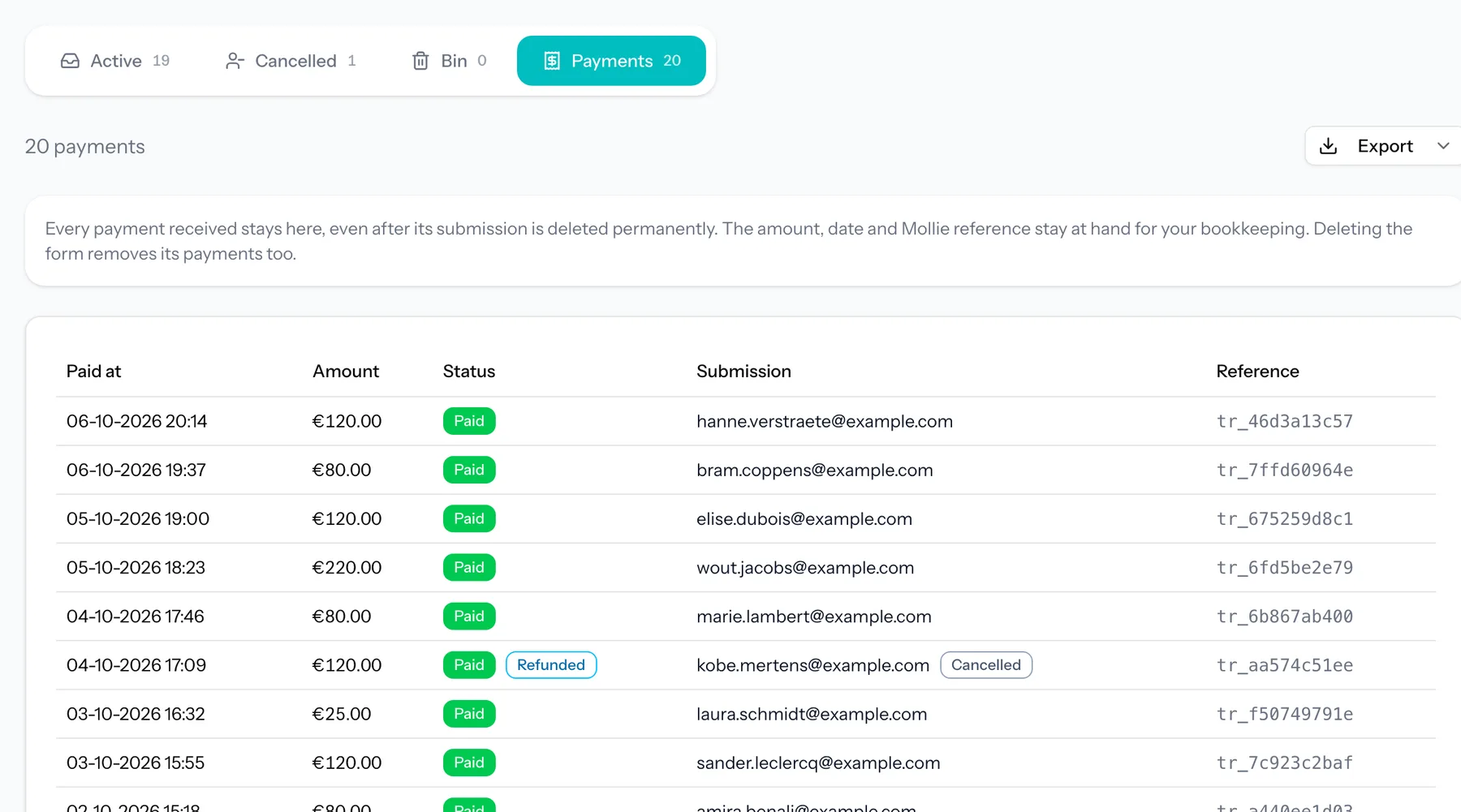
Export that list as CSV or Excel for your bookkeeping. A payment stays on it even after the registration it belongs to is deleted, so your financial record does not depend on your retention period.
What TinyForms does not do
Better to know this before you start than halfway through the round.
- No reminder emails. TinyForms sends a confirmation to a member once they have paid, but it does not send reminders to people who have not registered or not paid. Those go through your own channels, as in tip 6. The submissions list and the personal links status show you who to remind.
- No direct debit and no recurring payments. Every payment is a one-off payment for one registration. Next season, members pay again through a new round: duplicate this year's form, adjust the prices and dates, and share the new link (or send new personal links). Clubs that collect a monthly fee by direct debit are better served by their bank or a dedicated membership administration package.
What does it cost?
Building the form, sharing it, conditional questions and the CSV export work on the free plan. Payments through Mollie, prices per option and spreadsheet sync are part of the Pro plan; personal links are part of Business. Every new workspace trials Pro for fourteen days, so you can build and test your membership form with a real payment before deciding. See the pricing page for the details. Running a summer camp as well? Our guide to camp registrations with online payment uses the same building blocks.
Frequently asked questions
Can members pay by bank transfer instead?
Not through a form that charges: choosing a priced membership type always leads to checkout. If a few members really want to pay by transfer, duplicate the form, switch payments off on the copy and send them that link. Once their money arrives, give their submission a label such as "Paid by transfer". Labels show up as a column in the list, and you can filter on them.
What happens if a payment fails or a member gives up at checkout?
The registration is still recorded, with the status failed or pending, so you can see exactly who did not finish. The member can simply fill in the form again. With personal links set to one answer per link, cancel or delete the unfinished registration first; that opens their link again.
Is collecting member data like this GDPR compliant?
You need member data to run your club, so collecting it is fine, as long as you say why, ask only for what you need and do not keep it longer than necessary. TinyForms is hosted in the EU, shows your privacy notice on the form and deletes submissions automatically after the retention period you choose. More in data and privacy, and on our page for associations and sports clubs.