
Every December, somebody at the school, the football club or the scout group says the same thing: "Shall we ask Santa to come?" A few weeks later that somebody is juggling a list of children's names in a group chat, three families who all want the same Saturday afternoon, a spreadsheet of addresses and a sack of presents that turns out to be two short.
It does not have to go that way. Whether Father Christmas sits in a grotto at the Christmas fair, drops in on the club party or visits families at home to raise money for your group, the organising comes down to the same few questions: who is coming, how old are the children, what should Santa know about them and, for home visits, where and when.
Below you will find three ways to organise a Santa visit, practical tips from organisers who have done it before, a word on handling children's details with care, and a step-by-step guide to one booking form in which parents register their children, pick a time slot and pay straight away.
In short:
- Let families book in advance with each child's first name and age, so every child gets a present that suits them.
- Ask parents for two or three lines Santa can mention: something that went well this year, and one small thing to work on.
- Plan home visits per neighbourhood in fixed time slots, with one family per slot and a fixed price per visit.
- Ask only what Santa really needs, and make sure the details disappear again after the party.
Three ways to organise a Santa visit
At the club or school Christmas party
The simplest version. Santa arrives at the party, sits down in a big chair and calls the children up one by one for a chat, a photo and a present. What makes or breaks it is preparation: if Santa knows each child's name and has a present ready for every age, the line moves quickly and no child goes home empty handed. Registration also tells you how many presents to buy.
A Santa's grotto with booked time slots
A grotto at the Christmas fair is a fundraiser in its own right, and the queue is its biggest problem. Booked time slots solve that: each family gets five or ten minutes with Santa at a time they chose, and nobody stands outside in the cold for forty minutes. You know in advance how many presents you need, and the money is in before the fair opens.
Santa home visits as a fundraiser
Santa rings the doorbell, has a quiet chat with the children in their own living room, reads a few lines from his big book and hands over the presents the parents left by the door. Families love it and are happy to pay for it, which makes home visits a popular way for youth groups and clubs to raise funds. It does take the most planning: addresses, a route and a schedule that holds up over a whole evening.
Practical tips for a smooth visit
- Register every child in advance. First name and age are enough. With the ages you can buy presents per age group (for instance under 4, 4 to 7 and 8 and over), and Santa never has to guess a name.
- Let parents write for the big book. Two or three lines per family: what went well this year (swimming certificate, a new baby brother they are proud of) and one small thing that could be better (tidying up, going to bed on time). Ask them to keep it kind. Santa reads it aloud, and a child should never feel embarrassed in front of others.
- Wrap and label presents per child. At a party, sort the bags by age group with the child's name on them. For a home visit, the parents buy the presents themselves and leave them in a bag by the front door.
- Plan home visits by neighbourhood. Twenty minutes in the living room plus ten minutes to get to the next door is a realistic pace. With two Santas, give each one an area of town so nobody drives back and forth all evening.
- Charge a fixed price per visit. One amount per family is easier to explain than a price per child, and a family with three children takes no more time than a family with one.
- Arrange enough helpers. A driver, someone who carries the sack and keeps an eye on the time, someone at home with the phone. Plan their shifts the same way you plan the visits; our guide on filling every volunteer shift explains how.
- Agree on a phone number for the evening. If Santa runs twenty minutes late, the next families want to know.
Children's details: ask less, keep them briefly
A Santa booking form quickly collects more than you would think: children's names and ages, home addresses, and a few personal lines about each child. Treat that with care.
- Ask only what Santa needs. A first name and an age. No surname, no date of birth, no school, no photo.
- Keep the big book lines light. Ask parents not to write anything about health, family circumstances or anything a child would rather keep private.
- Do not put it all in a shared spreadsheet without reason. Give each Santa a printed list of their own visits for that evening, and collect the sheets again afterwards.
- Make it disappear after the party. Your workspace has a retention period: submissions older than that are deleted automatically every night. It counts from the day each booking came in, so choose a period that runs past the visit: 60 days covers bookings from early November for visits in mid December. The free plan allows up to 30 days, so there you open bookings no more than four weeks before the party. Because the period applies to the whole workspace, you can also simply clear this form's submissions yourself in January.
Our page on privacy-friendly forms and the help article on data and privacy explain how the retention period and the deletion work.
How to build the booking form in TinyForms
One form covers both the party and the home visits. Start from the event registration template, which already asks for the contact details you need and can take payment.
Step 1: The parent's details
The template already asks for a name, an email address and a phone number; remove the organisation question. The email address is where the confirmation goes; the phone number is for the evening itself, if Santa is running late.
Step 2: The children, in one booking
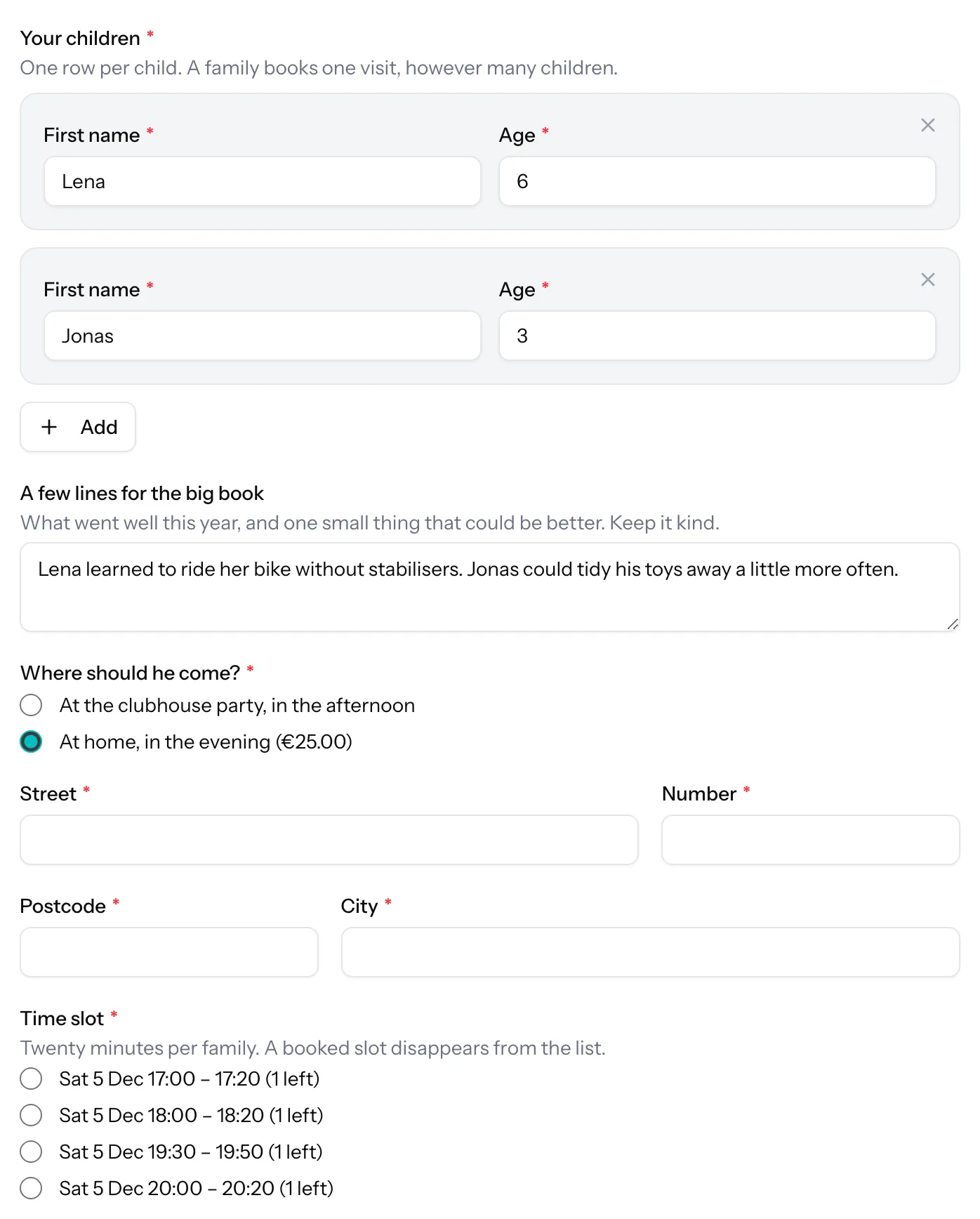
Add a repeater, "Your children", with two fields per row: first name and age. Parents add a row for each child, so a family with three children fills in one form rather than three. Under it, add a long text question for the big book, with a help text that says what you are hoping for: "What went well this year, and one small thing that could be better. Keep it kind." The repeater is part of the Pro and Business plans.
Step 3: Where should Santa come?
A choice between "At the club party" and "At home". With payments on, each option can carry its own price: the party free for members, for instance, and a home visit at a fixed €25. The total follows the choice. Want to charge per child at the party after all? Add a number question "How many children?" with a price per unit. The rows of the repeater do not count towards the price on their own.
Step 4: The address, only for home visits
Add the Address macro, which puts the street, number, postcode and city on the form in one step. Then give each of those fields the condition "Where should Santa come? equals At home". Families coming to the party never see them, and you never store an address you do not need.
Step 5: Time slots, one family per slot
Add a time slot question and give it the same condition, so it only appears for home visits. In the generator, choose the evening, the start and end time (for example 17:00 to 20:30), a slot of 20 minutes, a break of 10 minutes for the journey to the next door, and a capacity of 1. Every visit becomes an option with exactly one place. Switch on "Show how many spots are left", and a booked slot simply disappears from the list. Visits on several evenings? Generate a second run; it is added to the same list.
A limit counts bookings, not children: a family with three children takes one slot, which is exactly what you want for a home visit. Running two Santas in two parts of town? Ask "Which area do you live in?" first, give each area its own time slot question, and show only the matching one with conditional logic. The Halloween post shows the same time slot generator for start times. Time slots work on every plan.
Step 6: Payment while families book
Connect your own Mollie account once, and the form charges the visit at the moment a family books. The submission list shows who has paid, so you never chase a bank transfer. Fill the payment description with the parent's name, "Santa visit {Name}", rather than the child's: it ends up on a bank statement. Payments through Mollie are part of the paid plans.
Step 7: A closing date
Set a closing date under Settings, a week before the first visit. That gives parents time to buy the presents and gives you time to plan the evenings. After that date the form shows your closed message instead.
Step 8: A confirmation with the time slot
In the confirmation email, a placeholder repeats what the family chose. "Santa will ring your bell on {Time slot}" tells them when; add the practical part yourself: leave the presents in a bag by the door with each child's name on it, keep the lights on, and have the children ready a few minutes early. The help article on email notifications explains the placeholders.
Step 9: Export the evening as a route list
Download the submissions as CSV or Excel and sort them by time slot: that is your route for the evening, with the address next to every visit and the children's names and ages in one cell. Print one sheet per Santa.
Two things TinyForms does not do for you: it does not plan a route between the addresses, and it does not send a reminder the day before the visit. Put the visits in a sensible order per area when you hand out the slots, and send the families a short message yourself the day before if you want to.
Just a party, no payment? Collect replies
For a Christmas party where Santa drops by and there is nothing to pay, a simple reply form is enough: is your child coming, how old are they, and is there anything Santa should know. Everything for that works on the free plan, and parents do not need an account.
Frequently asked questions
How long should a home visit take?
Fifteen to twenty minutes in the house is plenty for a chat, a few lines from the big book and the presents. Leave five to ten minutes between visits for the journey and the odd family that keeps Santa talking.
Can a family with three children book one slot?
Yes. A limit counts bookings, not people, so one family takes one slot however many children it brings. The children are listed in the same booking.
Does TinyForms send a reminder the day before?
No. The confirmation email goes out the moment a family books, with the time slot in it. A reminder the day before is something you send yourself, from the export.
Can parents book without paying online?
Yes. Payment is optional per form. Many clubs keep the party free for members and only charge for home visits.